Paste Your Vibes Link
Supports all public Meta AI Vibes video URLs
Processing link...
Support savevideoraw
This tool is 100% free forever. If it saved you time, a small donation helps keep the servers running and the project alive.
MP4 clean, instant — 100% free, no login, no limits.
The fastest way to save your Meta AI Vibes creations.
Supports all public Meta AI Vibes video URLs
This tool is 100% free forever. If it saved you time, a small donation helps keep the servers running and the project alive.
Vibes is Meta's AI-powered short video generation platform — letting anyone create stunning, shareable AI videos directly from text prompts inside Meta's ecosystem.
Vibes is the AI video generation feature integrated into Meta AI — accessible via meta.ai, Instagram, Facebook, and WhatsApp. It allows anyone to turn a text description or image into a short, shareable AI-generated video clip in seconds.
Unlike professional tools that require subscriptions or technical knowledge, Vibes is designed for casual, social-first content creation. The focus is on speed, shareability, and creative expression — ideal for memes, social posts, reels, and personal projects.
Vibes is built on Meta's own AI research infrastructure, including Emu Video and Movie Gen — Meta's state-of-the-art video generation models that power high-quality, fluid video output.
Vibes is powered by Meta's Movie Gen — a family of large-scale foundation models for video generation announced in October 2024. Movie Gen can generate high-quality video, audio, and personalized content from simple text descriptions.
The system combines transformer-based video diffusion with large language understanding, allowing it to interpret nuanced prompts and produce coherent short clips with realistic motion.
Earlier versions of Vibes were powered by Emu Video (2023), Meta's first publicly available video generation model — demonstrating Meta's multi-year investment in AI video research.
Your text prompt is processed by a large language model that extracts intent, style, subject, and motion cues from your description.
A video diffusion model iteratively refines a noisy latent video representation into a coherent, visually consistent clip guided by the encoded prompt.
Individual frames are synthesized and stitched together to produce smooth, temporally consistent video with natural motion flow.
Generated videos are encoded, stored on Meta's global CDN, and streamed directly — making them instantly shareable across Facebook, Instagram, and WhatsApp.
Vibes is designed to make AI video creation social, accessible, and fun — combining creative power with seamless integration across the Meta platform ecosystem.
✓ Strengths
⚠ Limitations
Vibes is available for free to all users of Meta AI. You can access it directly at meta.ai by signing in with your Facebook or Instagram account.
You can also generate Vibes videos directly inside Instagram, Facebook, and WhatsApp by opening the Meta AI chat and asking it to create a video.
Availability may vary by region — Meta is gradually expanding access to more countries. Users in the US, Canada, Australia, UK, and many other markets have full access.
💡 Quick start: Go to meta.ai → click "Imagine a video" or type a prompt → Vibes generates your video instantly.
🚀 Where to Find Vibes
Meta AI Video is the broader family of video generation technologies developed by Meta — powering not just Vibes, but a new generation of AI-assisted creation across Meta's entire platform ecosystem.
Meta has been investing heavily in AI video research since 2023, with the goal of making video creation as easy as writing a sentence. Their flagship research project, Movie Gen, was unveiled in October 2024 — a 30-billion parameter model capable of generating high-quality video with synchronized audio from text alone.
Movie Gen represented a major leap in AI video: it can generate 1080p video up to 16 seconds, add realistic sound effects and background music, edit existing videos with natural language instructions, and even generate personalized videos featuring real people from a single photo.
Vibes is the consumer-facing product built on top of this research infrastructure — making Meta's most advanced video AI accessible to billions of users across Facebook, Instagram, and WhatsApp.
📅 Meta AI Video Timeline
Complete step-by-step guide — takes less than 30 seconds. No account, no software needed.
Note: All video copyrights belong to Meta and the original video creators. This tool is intended for personal use only. Please respect creator rights.
By using this tool you agree to the Terms of Use of savevideoraw.com.
Find the Meta AI Vibes video you want to download and copy its link.
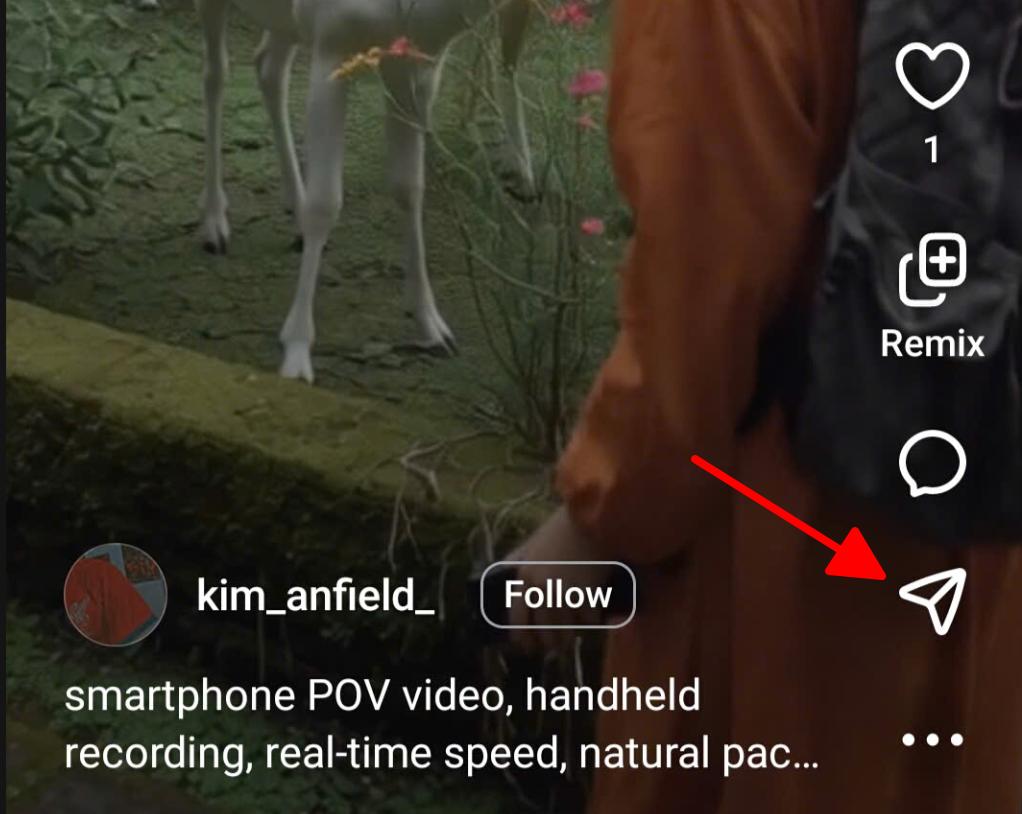
Open the Meta AI app or find a Vibes video on Instagram or Facebook. Tap the Share button → tap "Copy Link" to copy the video URL to your clipboard.
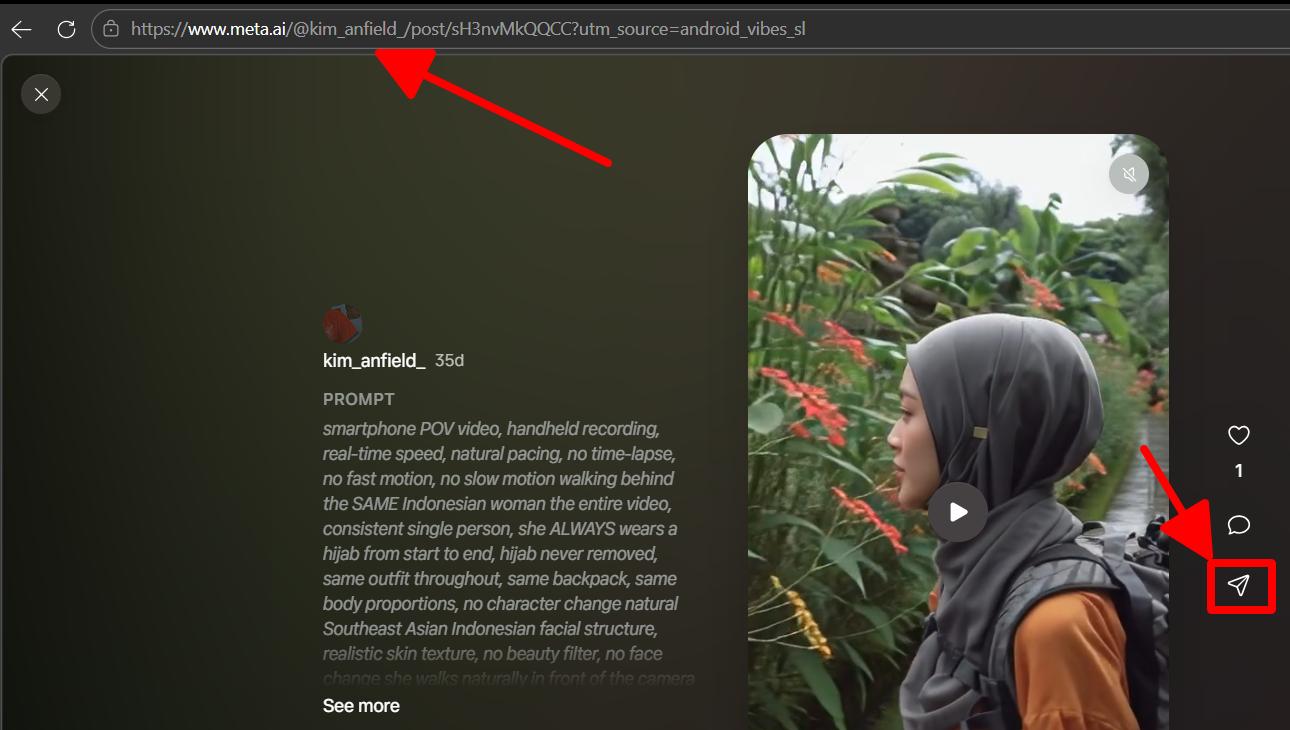
Visit meta.ai in your browser and open a Vibes video. Copy the URL directly from your browser's address bar — it will look like https://www.meta.ai/@username/xxxxx.
Visit savevideoraw.com/vibes in any browser. Paste the link you copied into the input box at the top of the page and click "Download Now".
Once the video is processed, SAVEVIDEORAW will display available download options:
Download the highest available resolution — clean, watermark-free MP4 for personal use.
When multiple resolutions are available (e.g. 960p, 720p, 540p), choose the quality that suits your needs.
Click your preferred format and the video will download directly to your device. On mobile your browser may prompt you to confirm — tap "Download" to save.
All Vibes video content is the intellectual property of Meta and the original creator. Downloaded videos are for personal use only — do not redistribute or repurpose commercially without permission.
Meta applies content watermarks and metadata to AI-generated videos. By downloading, you agree to use them responsibly.
SAVEVIDEORAW supports more than just Vibes — download from all your favourite AI video platforms.
>Download multiple Vibes AI, Meta AI videos at once, packaged into a single ZIP file.
Try now →Download OpenAI Sora videos without watermark. MP4, GIF, and thumbnails — 100% free.
Try now →Download multiple Sora videos at once, packaged into a single ZIP file.
Try now →Download Chinese AI videos from Jimeng and Seedance 2 without watermarks.
Try now →Save TikTok videos without watermarks in full HD. Supports mobile and desktop links.
Try now →Download Facebook videos in full HD quality. Supports public posts, reels, and stories.
Try now →Remove watermarks from Gemini AI generated images using our AI-powered removal tool.
Try now →Purpose-built for AI video platforms with features no other downloader offers.
Perfectly clean MP4 file, completely free of platform logos.
CDN-powered delivery gets your video ready in seconds, not minutes.
We never ask for your account, email, or any personal information.
No subscriptions, no paywalls, no premium tiers. Free forever.
Choose from multiple resolutions when available — best quality by default.
Scan to download directly on your phone — no copy-pasting required.
Yes. We retrieve the original CDN video file directly from Meta's servers — before any watermark overlay is applied by the app. The resulting MP4 is completely clean.
Meta AI video links can expire after a period of time or if the creator deletes the video. If a link fails, try re-opening the video on meta.ai and copying a fresh URL.
No account is needed to use SAVEVIDEORAW. Just paste the public Vibes video link and download. To create Vibes videos yourself, you will need a Meta account (Facebook or Instagram).
Yes! SAVEVIDEORAW is fully optimized for mobile. We also provide QR codes so you can scan on your phone and download directly — no copy-pasting required.
When Meta provides multiple resolution streams (e.g. 960p, 720p, 540p) in the video's DASH manifest, we show you quality buttons to pick from. Otherwise the best available quality is downloaded automatically.
Downloaded videos are for personal use only. All video content is copyrighted by the creator and Meta. Do not redistribute videos commercially without permission. Always respect the creator's rights and Meta's Terms of Service.
Vibes is the consumer product — the social video generator you see on meta.ai and in Instagram/Facebook. "Meta AI Video" refers more broadly to the underlying research and model infrastructure (Emu Video, Movie Gen) that powers Vibes and future Meta video features.
Sora (OpenAI) is a professional-grade tool producing longer, higher-resolution video — up to 60 seconds at 1080p — but requires a paid ChatGPT Plus subscription. Vibes is shorter and simpler but completely free and deeply integrated with Meta's social platforms.
Paste your meta.ai link above and get a clean, watermark-free MP4 in seconds.