savevideoraw
Free & Instant Download

Download Jimeng AI Videos
Without Watermark

Seedance 2.0 · 即梦AI — MP4 original quality, 100% free, no login, no limits.
The fastest way to save your Jimeng creations.

✓ No Watermark ✓ No Login Required ✓ 100% Free Forever ✓ Mobile Friendly ✓ Instant Download

Paste Your Jimeng Link

Supports all public Jimeng AI / Seedance share URLs

⚠️ Personal use only. Do not redistribute without permission. All video copyrights belong to their creators and ByteDance / Jimeng AI.
💡 Open Jimeng AI → tap the share arrow ↗ on your video → tap the link icon → paste below
Processing link...
⚠️ Encountered an error? Report it: t.me/+qz_eqCJwId40Mjhl
Telegram support QR code
AI Technology

What is Jimeng AI & Seedance 2.0?

Jimeng AI (即梦AI, jimeng.jianying.com) is ByteDance's flagship AI video generation platform powered by the Seedance model family — capable of producing cinematic, high-quality AI videos from text or image prompts.

30s
Max video length
1080p
Max resolution
2.0
Seedance version
Free
Tier available


ByteDance's Premier AI Video Studio

Jimeng AI (即梦AI) is ByteDance's AI creative platform that integrates text-to-video, image-to-video, and AI image generation in a single product. It is accessible at jimeng.jianying.com and is the creative AI engine powering much of Jianying (CapCut's Chinese counterpart).

The platform targets creators, marketers, and everyday users who want to generate professional-looking AI videos and images quickly — without needing advanced technical knowledge. With a free tier available, Jimeng is far more accessible than Sora for users in supported regions.

Jimeng's output quality has rapidly improved with the Seedance 2.0 model, producing videos with smooth motion, cinematic lighting, and impressive detail that compete directly with Western AI video tools.

Text-to-video Image-to-video 1080p quality Free tier Seedance 2.0 By ByteDance
  • 🎬
    Text-to-Video Generation Turns written prompts into high-quality video clips in seconds
  • 🖼️
    Image-to-Video Animates still photos or AI-generated images into moving clips
  • 🆓
    Free Tier Available Daily free generation credits — no subscription required to start
  • 🎨
    AI Image Generation Generate images as well as videos in one unified platform
  • 📱
    Mobile & Web Full-featured web app and mobile app available for iOS and Android

What is Seedance 2.0?

Seedance is the name of ByteDance's proprietary video generation model family — the AI engine that powers Jimeng AI. Seedance 2.0 is the latest and most capable version, released in early 2026, delivering a significant leap over its predecessor in motion quality, consistency, and prompt adherence.

The model uses a diffusion-transformer architecture similar in spirit to Sora, processing video as spacetime patches to understand both spatial composition and temporal motion simultaneously. This allows it to produce videos where objects move naturally and camera angles change fluidly.

Seedance 2.0 is particularly known for its cinematic motion and its ability to maintain subject consistency across frames — a common weakness in earlier AI video models. It supports both photorealistic and stylized outputs.

🌫️
Diffusion-Transformer Core

Seedance 2.0 combines diffusion denoising with a transformer backbone, iteratively refining from noise into coherent video guided by your text prompt.

🔲
Spacetime Patch Processing

Like Sora, video frames are split into space-time patches, letting the model understand motion trajectories rather than treating each frame independently.

🎯
High Prompt Fidelity

Seedance 2.0 significantly improved prompt-following accuracy, meaning the generated video closely matches the scene, style, and action you describe.

🎥
Cinematic Motion Quality

The model is trained with a focus on smooth, natural movement — avoiding the jitter and distortion common in earlier AI video tools.

Full Capabilities of Jimeng AI

Jimeng AI offers a comprehensive suite of AI creative tools in a single platform, from video generation to image creation and editing.

✍️

Text-to-Video

Generate video clips up to 8 seconds from text descriptions in various styles — realistic, cinematic, animated, and more.

🖼️

Image-to-Video

Upload a still image and have Jimeng bring it to life with natural-looking motion, camera movement, and scene evolution.

🎭

Style Control

Generate in photorealistic, anime, oil painting, watercolor, and dozens of other art styles with precise style keywords.

📹

Camera Movement

Control camera behavior: zoom in, zoom out, pan, dolly shots, orbit, and static camera modes.

🆓

Free Credits Daily

New users receive free daily generation credits. Paid plans unlock more credits and priority generation queues.

🌐

Community Feed

Browse a public explore feed of videos made by other users — great for prompt inspiration and discovering what the model can do.


Strengths vs. Current Limitations

✓ Strengths

  • • Free tier with daily credits
  • • Smooth, cinematic motion quality
  • • Wide range of visual styles
  • • Image-to-video capability
  • • Strong community explore feed
  • • Fast generation speed

⚠ Limitations

  • • Max 30 seconds per clip
  • • Interface primarily in Chinese
  • • Limited availability outside Asia
  • • Watermark on free-tier downloads
  • • Occasional hand/finger distortion
  • • Text rendering in video is limited

Jimeng AI vs OpenAI Sora — How Do They Compare?

Both Jimeng AI and Sora are top-tier AI video generation platforms, but they cater to different audiences with different strengths.

Feature Jimeng AI (Seedance 2.0) OpenAI Sora
Max video length 30 seconds 60 seconds
Free tier ✓ Yes (daily credits) ✗ Plus/Pro only
Developer ByteDance OpenAI
Resolution Up to 1080p Up to 1080p
Image-to-video ✓ Yes ✓ Yes
Primary audience Asia / Global 18 countries
Generation speed ⚡ Fast Moderate

Both platforms are excellent — the right choice depends on your needs. Jimeng is ideal for quick, free experimentation; Sora excels for longer, more complex video generation.

How to Access Jimeng AI

⚡ Free & Paid Plans Available

Jimeng AI is accessible at jimeng.jianying.com via any web browser, and also via the dedicated mobile app. Unlike Sora, you can start generating videos with a free account using daily credits.

To download videos from Jimeng without watermark, your video must first be published/public. Private draft videos cannot be accessed via the share link API.

Users in Vietnam and most of Asia can access Jimeng AI directly. If your region is restricted, a VPN may be required — though this is at your own risk and subject to Jimeng's Terms of Service.

💡 Free to start! — Visit jimeng.jianying.com, register, and use your free daily generation credits immediately.

📋 Jimeng AI Plans

🆓 Free Plan

  • • Daily free generation credits
  • • Access to Seedance 2.0 model
  • • Watermark on downloaded videos
  • • Community explore feed access

⭐ Paid Plans

  • • More generation credits per month
  • • Priority generation queue
  • • Higher resolution outputs
  • • Commercial usage rights
⚠️ When downloading videos, make sure your video is set to Published (Public) — only published videos have an accessible share link for watermark-free download.
Quick Guide

How to Download Jimeng AI Videos Without Watermark

Complete step-by-step guide — takes less than 30 seconds. No account, no software needed.

Note: Please consider potential copyright issues before downloading. The watermark on AI-generated videos serves as an important authenticity indicator. By proceeding, you agree to our Terms of Use.

1

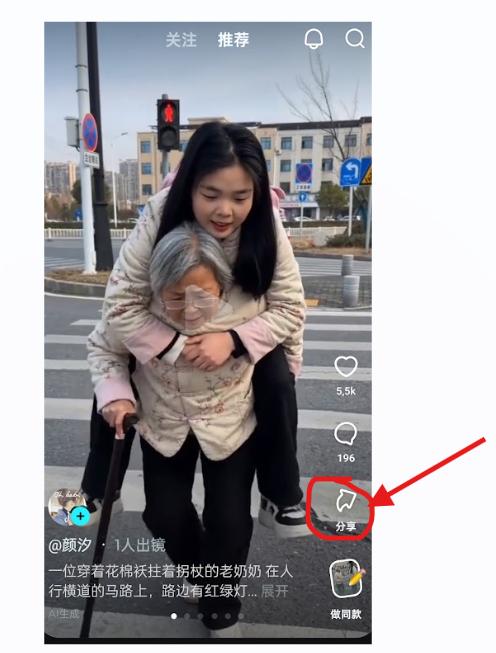
Open Your Video and Tap the Share Icon

Open one of your videos or any public video on the Jimeng AI app (即梦AI). Tap the share arrow icon ↗ located in the corner of the screen.

Jimeng AI — tap the share arrow icon
2

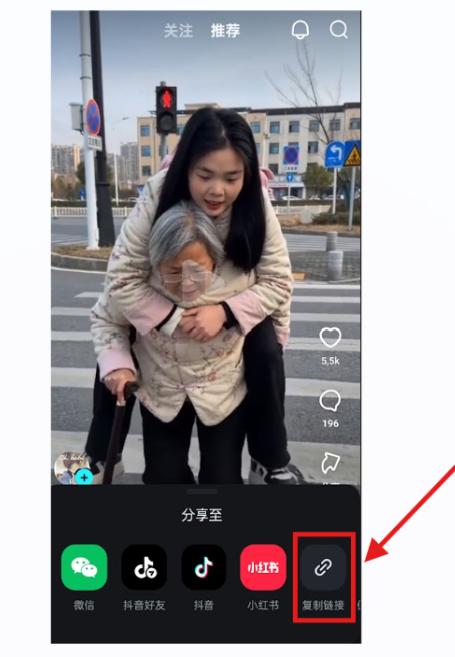
Copy the Public Video Link

After tapping the share arrow, several sharing options will appear. Tap the link icon 🔗 to copy the public video share link to your clipboard.


On Mobile (iOS / Android)

In the Jimeng AI app, tap the share arrow ↗ on your video, then tap the link icon to copy the share URL. The link will look like:
https://jimeng.jianying.com/s/xxxxx

Jimeng AI — tap link icon to copy share URL

On Computer (Web)

Visit jimeng.jianying.com in your browser. Browse the explore feed or your own videos. Click the share / more options button on the video you want to download, then select Copy Link to get the share URL.

Jimeng web — copy video link
3

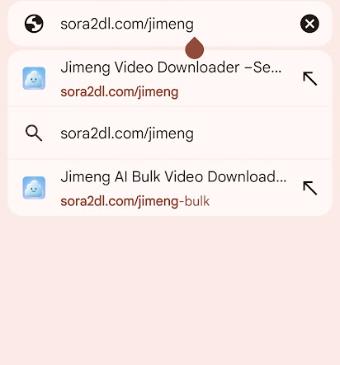
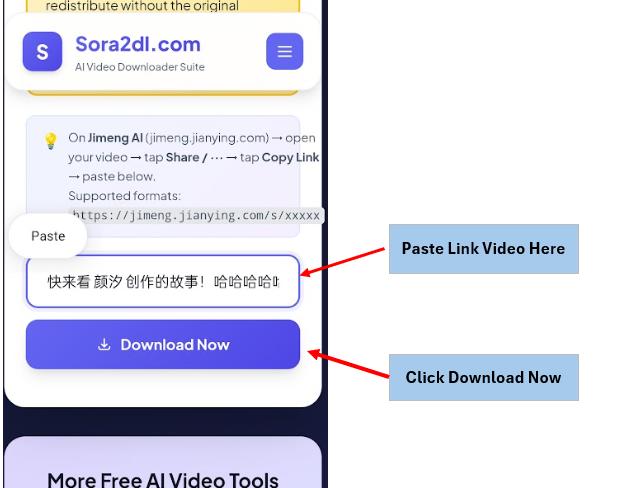
Paste the Link on savevideoraw

Visit savevideoraw.com/jimeng in any browser. Paste the link you copied into the input box at the top of the page. Click "Download Now" and the system will process your video in about 5 seconds.

Paste Jimeng link into Savevideoraw.com download box
4

Download the Watermark-Free Video

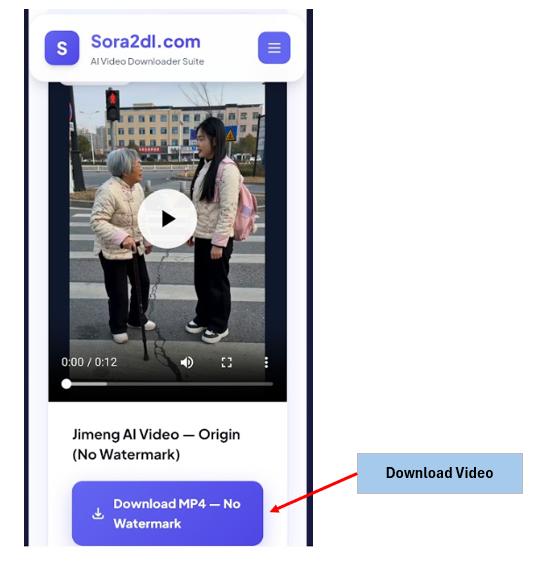
Once processed, the result will appear on screen. Click "Download MP4 — No Watermark" to save the clean original video to your device.

✅ Origin (No Watermark)

The original clean MP4 file stored on Jimeng's CDN — no watermark overlay. For personal use only.

🎬 Standard (Watermark)

The regular video with the Jimeng watermark. Recommended when sharing publicly to credit the AI source.

Download Jimeng video without watermark result

On mobile, your browser may prompt you to confirm the download. You can also use our Bulk Jimeng Downloader to download up to 5 videos at once in a ZIP file.

⚠️ Important Notice

Your video must be published/public on Jimeng before it can be downloaded without watermark. Private draft videos are not accessible via the share link.

All video content belongs to its creator and ByteDance / Jimeng AI. By downloading, you agree to use videos responsibly and in accordance with applicable terms of service.

Why savevideoraw

The Best Way to Save Your Jimeng Videos

Purpose-built with features designed for AI video platforms.

No Watermarks

Fetches the original origin_video directly from Jimeng's CDN — completely clean.

Lightning Fast

Direct API access returns the origin video URL in seconds, not minutes.

No Login Ever

We never ask for your Jimeng account, email, or any personal information.

Always Free

No subscriptions, no paywalls, no premium tiers. Free forever.

Instant Preview

Watch the video right in your browser before downloading — click the thumbnail to play inline.

Bulk Download

Download up to 5 Jimeng videos at once as a convenient ZIP archive.

Full Original Quality

Original resolution and bitrate preserved — no re-encoding, no quality loss.

Shareable Links

Each video gets a permanent direct download URL to bookmark or share.

More Tools

Other Free Downloaders

savevideoraw supports more than just Jimeng — download from all your favourite AI video platforms.

Help

Frequently Asked Questions

What is Jimeng AI?

Jimeng AI (即梦AI, jimeng.jianying.com) is ByteDance's AI creative platform powered by the Seedance model. It generates high-quality AI videos and images from text or image prompts, with a free tier available via daily credits.

What is Seedance 2.0?

Seedance 2.0 is the latest version of ByteDance's proprietary video generation model that powers Jimeng AI. It features a diffusion-transformer architecture with improved motion quality, prompt fidelity, and cinematic output compared to its predecessors.

Is the downloaded video really watermark-free?

Yes. We call Jimeng's public API to retrieve the origin_video — the raw file stored on their CDN without any watermark overlay. The watermarked version is also available if you prefer to credit Jimeng AI.

Why must the video be published first?

Jimeng only makes the clean origin file accessible for published (public) videos. Private drafts are not accessible via the public share link API. You need to publish your video on Jimeng before the share link will work.

What URL formats are supported?

We support Jimeng AI share links in the format https://jimeng.jianying.com/s/xxxxx. Copy the link directly from the Share button inside the Jimeng app or website.

Why isn't my link working?

Make sure the video is published/public — draft or private videos cannot be downloaded. Double-check that you copied the full URL. Share links may also expire after a period of time, so try generating a fresh share link from Jimeng.

Do I need a Jimeng or ByteDance account to use this?

No account is needed to use savevideoraw. Just paste the public Jimeng share link and download. To create videos on Jimeng AI itself, you'll need a free Jimeng account at jimeng.jianying.com.

Is it legal to download Jimeng AI videos?

Downloaded videos are for personal use only. All video content is copyrighted by its creator and ByteDance. Do not redistribute videos without permission. Always respect the creator's rights and Jimeng's Terms of Service.

How is Jimeng AI different from Sora?

Jimeng AI (Seedance 2.0) offers a free tier with daily credits, while Sora requires a paid ChatGPT Plus/Pro subscription. Jimeng is limited to shorter clips (up to 8 seconds), while Sora supports up to 60 seconds. Both produce high-quality AI videos but cater to different audiences and use cases.

Guides & News

Latest Articles

Tutorials, guides, and news about Jimeng AI and AI video generation.

Ready to Save Your Jimeng Videos?

Paste your share link above and get a clean, watermark-free MP4 in seconds.